York International Pen Pal
AT A GLANCE
At York University, the International department (York International) was looking for research and designs from students to launch a Pen Pal application. This application would be used by incoming international first-year students and current domestic students at York going abroad to study. Through this, current and incoming students can discuss topics on a forum or message each other individually about any qualms or questions they have about moving, thereby creating a closer-knit student body.
My Role
UX Researcher
UX Designer
Tools
Xtensio
Adobe XD
Team
Joanne Rego
Mike Finlayson
Rohit Soggi
Timeline
2 months
PROBLEM SPACE
When moving from one country to another for post-secondary education, many international students tend to feel lost because acclimating independently to a new environment can be nerve-wracking. Although social media groups exist for incoming classes, these tend to contain a large number of people and lack a certain intimacy. Conversely, many current York students who want to study abroad do have the help of York International but ultimately will still face a large culture shock when acclimating too. A pen pal application where students associated with York University (whether coming or going) can write to each other about their fears or experiences would help branch the gap between their present and future and decrease fear.
TARGET USERS
-
Incoming first-year international students (primary)
-
Current York students looking to study abroad (secondary)
LITERATURE RESEARCH
In order to understand the nuances of what we were searching for in our targeted users, we used current literature to find key points in what to look for when creating personae. Several bodies of work mentioned that:
-
Language and culture of the student shapes their values in life and can be an issue when getting lost in translation.
-
Family usually plays the main role in the amount support students get (emotional or financial).
-
Financial restrictions can impact the student’s choice of university and is the main concern for middle-class international students.
-
Mindset and feelings of the students correlate with their overall happiness.
PRIMARY RESEARCH
To garner some primary data more representative of the York University student body, we got data from domestic and international students. We interviewed students and asked them their:
International Students
-
Name
-
Current program
-
Country they are from
-
Interests/hobbies
-
Why they chose York
Domestic Students
-
Name
-
Current program
-
Interests/hobbies
-
Countries of interest for study abroad and why
Overall, we found that the secondary and primary research supported each other and that many international students chose York for financial reasons. New findings showed us that other reasons were proximity to family and reputability of particular programs that would help them eventually settle in Canada.
Conversely, many domestic students considering studying abroad wanted to leave the Canadian winters, immerse themselves in a different culture. and also explore possible heritage in countries they have ancestors from.

“I decided to go to York because the Schulich School of Business has a good reputation and good business programs. Plus, York University is in Toronto and I wanted to be closer to the city. I did apply to schools in the US too but ultimately because of costs and Trump getting elected, I chose Canada.”
—3rd year international student
“I’d like to maybe study abroad or visit Italy or Greece because they’re warmer countries. It would also be a different culture and language to learn and I would enjoy learning the Italian language and culture in particular because I have some heritage there.”
—4th year domestic student

PERSONAE
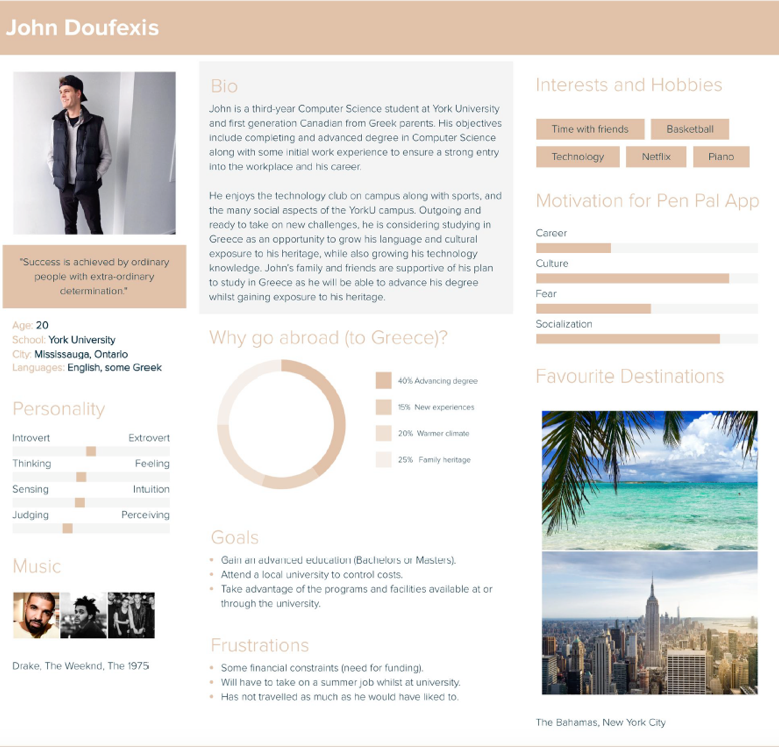
Collating our primary and secondary research, we were able to create personae that reflected our target users based on said research.
Primary Persona (Incoming International)

Secondary Persona (Current Domestic)
FEEDDBACK
After speaking with our product owners on the research that was found, we were asked to:
-
Hone in on the primary target user. The is because international students have a steeper and longer culture shock, and there are also more incoming international students than there are current students studying abroad.
-
Make the application interactive (besides just the virtual socializing) to increase incentive to download through something like a game during sign-up.
SCENARIOS
We drafted scenarios of our primary user persona to detect any potential pain points.
Background
Marija is an 18-year old in her final year in high school in Zagreb, Croatia. She has lived her whole life in Croatia but has travelled to different countries (lots in Europe) and has consequently cultivated a fondness of learning about new cultures. She has an older brother who attended and graduated York University, landed a job and is now working in Toronto. A few months ago, Marija was in the process of looking for universities to attend after graduation, with the interest of studying biology. On one hand, she had the option of attending a Croatian university but her parents suggested to her that it would be a better choice to consider universities outside of Croatia for better job opportunities. Since her brother was already in Toronto, Marija and her parents decided York University would be best as her brother could help her settle down and be there for emergencies.
A few months after applying to York University, Marija receives an e-mail from the university saying that she got accepted. The e-mail also provides her with various links to register for her York log-in, class schedule, orientation, Frosh and other events, and also an acceptance letter that she has to sign and send. She excitedly tells her parents and they tell her to sign and scan over her acceptance letter and to get started with adding her classes.
Plus Scenario
A few weeks goes by and Marija is caught up studying for her final exams. Soon, the realization that she is leaving settles in and she starts getting worried about fitting in a new environment and country, and researches more about Canada. Even though she found information online, there were not many specific things about the culture and classes at York University and she wishes she had someone on the inside who she could relay messages with. She decides to re-visit her inbox and finds the original e-mail that the university sent and also a link to to sign-up to a pen pal application where she can chat with students. She decided to give it a go and logs in with her Passport York User ID. The system requests Marija to complete her profile. First, she fills in her country of origin. Second, the system requests her degree major. Third, the system uses a series of images and questions, like a game, to learn her interests and hobbies.
Minus Scenario
Marija understands the need to enter her profile in order to use the Pen Pal Application. However, the game and its images are not intuitive. Marija’s English language skills are still a work in progress and the game uses some terminology she does not understand. The game also makes some Canadian references which she does not know. She finds this confusing, abandons the game, and does not complete her profile. She’s unsure why York would build a Pen Pal system, aimed at international students, and then make it difficult for them to use. Consequently, she does not use the Pen Pal system as a resource for information about York nor to socialize.
Feedback
Based on the scenarios, we found that while focusing on the target user was the right way forward, the small game that was suggested to be implanted seemed tedious and an obstacle to the overall goal of reducing fear and increasing familiarity.
FINAL DESIGN GOALS AND FEATURES
-
Fulfilling the need and want of students knowing more about York/places they plan to study abroad at by creating an opportunity for said students to share experiences.
-
Understanding how the needs of international students are met (using qualitative data that will be collected via the application).
-
Creating and maintaining a network of participants who have an incentive to share and receive information about relevant experiences, within the framework of an intuitive and enjoyable interactive platform.
-
Ensuring that the system is simple and easy to use through effective wire-framing.
-
A system for user authentication, for maintaining each user’s profile, and for gathering important information (such as their age, city, hobbies... etc.).
-
Validating the user by asking key information about them and gathering the information in an engaging way.
-
An in-system personal messaging system by users having an inbox, and the ability to send personal messages to other users.
-
Providing support to the product owners of the International Pen Pal project as they develop the Pen Pal International Application.
CALL-TO-ACTIONS
After debriefing with the product owners and conceptualizing the pain points that the target primary user would go through, we outlined the CTAs that would be a part of the application that would help minimize potential pain points. We had decided to hone in on user authentication, implementing a forum, and a messaging system.
User Authentication
-
Sign-up button (which will re-direct the student to the York page and have them enter their York e-mail and password).
-
The login in screen will have text-boxes for users to enter their York email and password.
-
Button for the user to ‘Login’ to the system.
-
‘Help Centre’ button at login and when inside the app to get more information.
-
Text boxes, date selection (for date of birth) and checkboxes to gather key information about user.
-
Button for the user to ‘finish creating [their] profile’.
-
Button for the user to ‘Sign Out’.

Forum
-
Navigation bar at the top with ‘New’, ‘Popular’ and ‘Filter’ tabs.
-
Navigation bar at the bottom with 'Home', 'Search', 'Notification' and 'Inbox' tabs.
-
Button at the top to 'Create a Post' on the forum.
-
Button at the top to see your own profile.
-
Clickable tags with posts.
-
Comment button to post, like and share.
-
Clickable profile icon that will show users' profiles.
-
Scrollable post which can be interacted with via comments and likes.
Messaging System
-
Images of boxes popping up to show where the icons are as a form of a tutorial when the user is first using the system.
-
Button to ‘Message’ another user when on their profile.
-
Notification button and icon including badges to show how many notifications a user has.
-
Button for the user to ‘Compose’ a message when in their inbox.
-
Clickable text box for the user to search who they would like to message.
-
Button to ‘Send’ a message.
-
Notification in the inbox that shows who messaged and how many messages are sent.
-
Row of buttons with icons to send non-text multimedia (e.g. images, videos... etc.).
-
Holding a message down to send an emoji (e.g. ‘liking’ or ‘hearting’) a message.
-
Button with a microphone icon for messaging via speech.
-
Button to view the ‘Profile’ of the other user a user is chatting to (so users can figure out more about the user they are messaging).
-
Button for the user to ‘Sign Out’.


FINAL LO-FI PROTOTYPES
We created functional lo-fi prototypes that show in particular the main call-to-actions of the application (user authentication, forum and messaging).
User Authentication #1

Creating an account through one’s York login, selecting interests and being directed to the home dashboard.
User Authentication #2

Viewing one’s profile and editing any information necessary.
Forum #1

Exploring the forum through the Home, Popular and Filter tabs.
Forum #2

Posting on the forum, looking at the engagement and viewing the profile of a user who engaged.
Forum #3

Searching through the forum for trending, recent and tagged material.
Messaging System #1

Looking at one’s inbox, and composing a new message.
MY OVERALL IMPACT
Through my conduction of research and design, fresh perspective was brought to York International’s attention. Although not yet launched, products owners informed our team that prior to working with us their ideas were too general but our research and design gave them a strong foundation that they will follow closely for when they do create the application.
Problems that arose
-
It was challenging trying to find an unbiased population sample for the primary research as the beginning of COVID-19 limited the amount of in-person contact.
What I Would Have Done Differently
-
I would have tried to obtain some proper user testing. Since it was our team focusing on building the prototype, we needed fresh perspective to see how a student might use the application (though once again it was hard to do so during COVID-19, though perhaps even a virtual run-through could have helped us improve).